82

In my own computer, running MacOSX, I have this in ~/.ssh/config

Host *
ForwardAgent yes
Host b1
ForwardAgent yes

b1 is a virtual machine running Ubuntu 12.04. I ssh to it like this:

ssh pupeno@b1

and I get logged in without being asked for a password because I already copied my public key. Due to forwarding, I should be able to ssh to pupeno@b1 from b1 and it should work, without asking me for a password, but it doesn't. It asks me for a password.

What am I missing?

This is the verbose output of the second ssh:

pupeno@b1:~$ ssh -v pupeno@b1
OpenSSH_5.9p1 Debian-5ubuntu1, OpenSSL 1.0.1 14 Mar 2012
debug1: Reading configuration data /etc/ssh/ssh_config
debug1: /etc/ssh/ssh_config line 19: Applying options for *
debug1: Connecting to b1 [127.0.1.1] port 22.
debug1: Connection established.
debug1: identity file /home/pupeno/.ssh/id_rsa type -1
debug1: identity file /home/pupeno/.ssh/id_rsa-cert type -1
debug1: identity file /home/pupeno/.ssh/id_dsa type -1
debug1: identity file /home/pupeno/.ssh/id_dsa-cert type -1
debug1: identity file /home/pupeno/.ssh/id_ecdsa type -1
debug1: identity file /home/pupeno/.ssh/id_ecdsa-cert type -1
debug1: Remote protocol version 2.0, remote software version OpenSSH_5.9p1 Debian-5ubuntu1
debug1: match: OpenSSH_5.9p1 Debian-5ubuntu1 pat OpenSSH*
debug1: Enabling compatibility mode for protocol 2.0
debug1: Local version string SSH-2.0-OpenSSH_5.9p1 Debian-5ubuntu1
debug1: SSH2_MSG_KEXINIT sent
debug1: SSH2_MSG_KEXINIT received
debug1: kex: server->client aes128-ctr hmac-md5 none
debug1: kex: client->server aes128-ctr hmac-md5 none
debug1: sending SSH2_MSG_KEX_ECDH_INIT
debug1: expecting SSH2_MSG_KEX_ECDH_REPLY
debug1: Server host key: ECDSA 35:c0:7f:24:43:06:df:a0:bc:a7:34:4b:da:ff:66:eb
debug1: Host 'b1' is known and matches the ECDSA host key.
debug1: Found key in /home/pupeno/.ssh/known_hosts:1
debug1: ssh_ecdsa_verify: signature correct
debug1: SSH2_MSG_NEWKEYS sent
debug1: expecting SSH2_MSG_NEWKEYS
debug1: SSH2_MSG_NEWKEYS received
debug1: Roaming not allowed by server
debug1: SSH2_MSG_SERVICE_REQUEST sent
debug1: SSH2_MSG_SERVICE_ACCEPT received
debug1: Authentications that can continue: publickey,password
debug1: Next authentication method: publickey
debug1: Trying private key: /home/pupeno/.ssh/id_rsa
debug1: Trying private key: /home/pupeno/.ssh/id_dsa
debug1: Trying private key: /home/pupeno/.ssh/id_ecdsa
debug1: Next authentication method: password
pupeno@b1's password:

11 Answers11

125

It turns out my key was not in the agent, and this fixed it:

OS X:

ssh-add -K

Linux/Unix:

ssh-add -k

You can list loaded keys using:

ssh-add -l

ssh-add -L # for more detail
18

Another possible reason is connection sharing: one might already be logged in on the other host without agent forwarding and connection sharing enabled. The second login with ssh -A (or equivalently specified in the config file) via the shared connection will silently ignore the -A flag. Only after completely logging out or disabling connection sharing for second login, the agent forwarding will work.

W.Mann
  • 281
11

For me, it was simply that the host I was connecting to (b1 in the original poster's example) was running it's own persistent ssh-agent. There's no debug output I could see to explain what was happening, the host just silently uses it's existing ssh-agent and no forwarding occurs. This makes sense to me in retrospect :p

The forwarding is like ssh port-forwarding: it's tunnelling, not client-server negotiation.

I assumed it was the latter - that having an ssh-agent running on the host would be necessary for agent forwarding, so I set it up at the beginning, but that was a mistake.

See the following examples:

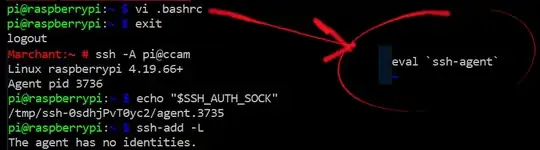
First I ssh to host ccam (a raspberry pi) with no Agent Forwarding and confirm there's no agent socket or added keys:

No agent forwarding

Secondly I edit .bashrc to ensure ssh-agent is running on the host (this was my mistake). You can see when I reconnect using -A to enable Agent Forwarding, the agent socket exists, but the agent has no identities (I now realise that is because this is showing the local ssh-agent socket rather than a forwarded one):

Added ssh-agent to host

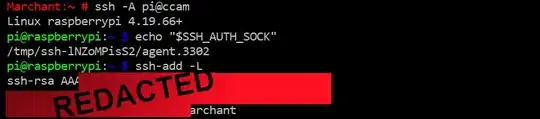
Finally, I remove the ssh-agent on the raspberry-pi host (not shown) and reconnect. You can see the key is finally available when inspecting using ssh-add -L:

Successfully forwarding ssh key

Stuggi
  • 3,656
8
  1. Check if your ~/.ssh/id_rsa ~/.ssh/id_dsa ~/.ssh/id_ecdsa files have the correct permissions which should be owned by your user and be chmoded 600.

  2. Check that you have the correct public key on pupeno/.ssh/authorized_keys on b1, and check if authorized_keys has a line break at the end of the key.

  3. Check if you have ssh-agent running, try to load keys via ssh-add

  4. Try GSSAPI-based authentication and forwarding with ssh -K

nhed
  • 629
8

I had problem with sshd server rejecting agent forwarding request because of no space left in /tmp. This was because sshd needs to create socket in /tmp. Cleaning disk up resolved my issue.

ssh -v said back then:

debug1: Remote: Agent forwarding disabled: mkdtemp() failed: No space left on device
4

For the benefit of other googlers who also arrived at this question:

Incorrect whitespace in a ~/.ssh/config file can also cause some head scratching.

I recently helped out one of my co-workers who had this:

# incorrect
host foobar ForwardAgent yes

instead of this:

# correct
host foobar
  ForwardAgent yes

I've also run into instances where missing indentation of the directives under the list of hosts made a difference to functionality, even though it's not supposed to.

Dale C. Anderson
  • 647
  • 2
  • 7
  • 13
3

Every SSH daemon must have:

AllowAgentForwarding yes

2

Yet another cause: If the target host's fingerprint doesn't match with your ~/.ssh/known_hosts, SSH automatically disables Agent Forwarding.

The solution is:

$ ssh -A -o UserKnownHostsFile=/dev/null  my-target-host
2

I had disabled agent forwarding for all hosts, thinking I could enable it for each specific host where I need it. Apparently that doesn't work.

Host *
  ForwardAgent no

Host myserver HostName myserver.example.nl ForwardAgent yes

The solution was to remove the ForwardAgent no from the Host * block.

1

Add following lines to .ssh/config file

  Host **Server_Address**
     ForwardAgent yes

Add key to SSH Agent

 ssh-add -K

Connect to Remote Server

ssh -v **username**@**Server_Address**

Run connection test against GitHub

ssh -T git@github.com

Run ls remote test against targeted git repository

git ls-remote --heads git@github.com:**account**/**repo**.git
0

If you're connecting to a machine running byobu/tmux it seems that sometimes you need to create a new window on the destination machine (e.g. Ctrl-B + C) after you connect with ssh -A so that you can use your ssh agent for onward authentication.

Pierz
  • 743