3

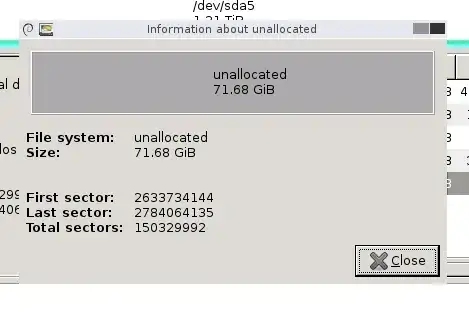
I am trying to use gparted to make my ntfs system/boot partition larger. I expanded the disk in ESX, providing an extra 60 GB or so of free space. I confirmed that this free space is available in gparted:
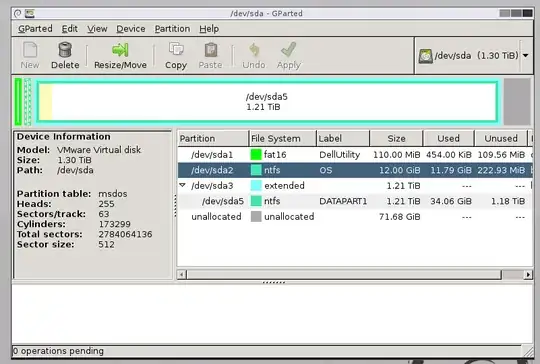
gparted main screen

unallocated space

However, when I try to go to "Move/Resize" the boot partition, there is no unallocated space for me to allocate.
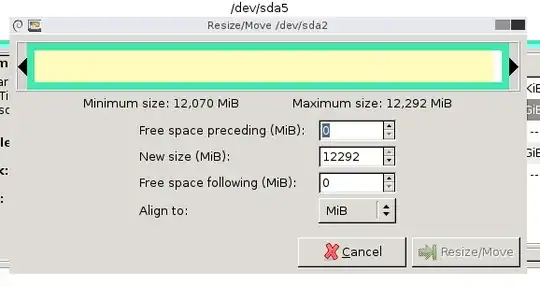
no unallocated space

It will let me resize the "extended" (non-boot) partition, which makes me think the issue is that the partitions are not contiguous.

If it's not obvious, I am no expert in partitioning/storage so any help is appreciated.

3 Answers3

3

First you need to move /dev/sda3 to the right, so that the unallocated space is before it instead of after it. Then you should be able to resize /dev/sda2.

Michael Hampton
  • 252,907
0

to be more specific read the following

http://kb.vmware.com/selfservice/microsites/search.do?language=en_US&cmd=displayKC&externalId=1007266

also read the hotfix info to see if it applies.

tony roth
  • 3,952
  • 20
  • 14
0

We had this grief too. In the end we found it easier to make a new virtual machine with a sufficiently large boot disk to allow for future growth. And all of our machines are cloned off this and get a second disk.

C: is reserved for OS and essential programs. D: is where all user data goes and large programs (in our case Oracle).

Hot expansion of D: is very easy (even with old software like ESX 3.5 and W2K3).