1

can anyone tell me how to configure/set a login script for users in a AD?

here is what I tryed: - in the default "NETLOGON" shared folder, I created a logon.bat (containing cmd.exe, just for test) - (for a test user) in user's profile/user profile/logon script I put logon.bat and nothing happens :(

(i'm new in Active Directory)

5 Answers5

3

The NETLOGON share is a special one that already exists not one that you create.

It is usually in C:\WINDOWS\sysvol\sysvol\*yourdomain*\scripts on the domain controller

JamesRyan
  • 8,204
1

I don't think you have the correct folder. As EK noted, the NETLOGON share is created and shared by default. You should not have to do anything, and if you changed anything this is likely what is not working.

1- Make sure that the NETLOGON share is pointing to %SystemRoot%\sysvol\sysvol\\scripts. Check all of the Domain Controllers.

2- Make sure that the clients can see that share and the contents, including the script. Check all of the Domain Controllers.

3- Double click on the script, and make sure it runs. Troubleshoot any issues.

NOTE: I asked in a comment to the question about why you aren't using Group Policy. I would recommend using GPO for this instead of the user property page. It is far easier to manage and to deploy.

tomjedrz
  • 5,974
0

On the client open up a command prompt and enter the following:

gpupdate /force

That will force a Group Policy update. Restart and see if that helps.

Also, you might want to have the script do something else, such as create a text file on their Desktop, just to make sure the script itself isn't to blame.

0

Firstly, have a read of KB322241 for the official "how to" of logon scripts, including the correct place to put a logon script in a GPO. I am of the opinion that you should be using GPO logon scripts rather than the NETLOGON share because they give additional flexibility and reduced admin overhead; others prefer NETLOGON for reasons of their own, but let's start with GPO.

Follow the steps in the article I linked, making sure that you pay particular attention to getting the location right. The "Show Files" button is very handy here.

You're creating a user logon script, so ignore everything under Computer Configuration and go to User Configuration instead.
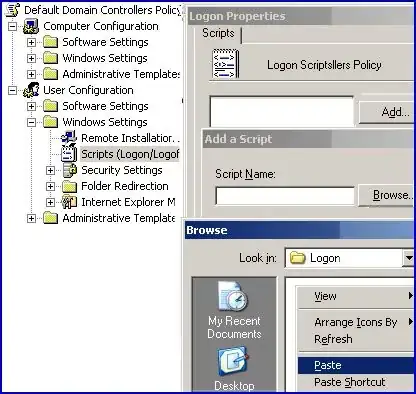
alt text
(source: computerperformance.co.uk)

Make sure you assign the logon script to a GPO which is linked to an OU which actually has users in it, otherwise it won't be applied. Default Domain Policy is OK for testing, but when you do it for real you probably won't want to put one there.

You should then use the Modelling or Results Wizard in the Group Policy Management Console to determine what policies are being applied to a given PC for a given user.

Glorfindel
  • 1,213
0

Rather than running cmd.exe test it with something you know for sure will not be running during logon. Notepad.exe is a popular choice for this. Then, after logging on, don't just look to see if it's on the screen. Use the Task Manager to see if it's running.