20

I hope someone can help. We've got a Windows Server 2008 R2 machine with 16GB of RAM that keeps getting all its available memory eaten by something. Nothing in Task Manager or Resource Monitor reveals any process using memory above 300MB... but memory usage on the server is 15.7GB.
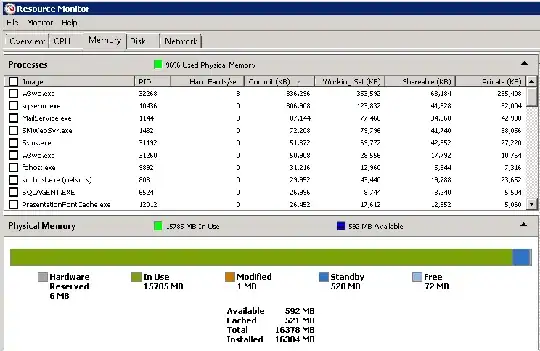
https://i784.photobucket.com/albums/yy129/ThunderPeel2001/ram-usage.gif

The only things running are SQL Server 2008 and IIS7.5 (with ASP.Net).

Note: RAM usage after a reboot starts low and works its way up. After a week or so we keep finding outselves in this situation.

How can I discover what's eating all our memory? :(

6 Answers6

15

Is this a 64bit server - do you have the lock pages in memory local policy enabled? SQL is likely consuming the rest of your memory If you look at the perfmon counters you will see the memory allocation

Here is an article that explains it in depth

You can also view the counters in SQL

SELECT
    object_name
   ,Counter_name
   ,cntr_value
   ,ROUND(( cntr_value * 8192.0 ) / 1048576, 0) AS cntr_value_MB
FROM
    sys.dm_os_performance_counters
WHERE
    object_Name LIKE '%Buffer Manager%'
    AND RTRIM(counter_name) IN ( 'Free pages', 'Total pages',
                                 'Database pages' ) 
UNION SELECT
    object_name
   ,Counter_name
   ,cntr_value
   ,ROUND(( cntr_value / 1024 ), 0) AS cntr_value_MB
FROM
    sys.dm_os_performance_counters
WHERE
    counter_name IN ( 'Target Server Memory (KB)',
                      'Total Server Memory (KB)' )
CPU_BUSY
  • 2,342
6

Quick test: restart SQL Server.
Another quick test: restart IIS.

You'll know for sure if one of them is the culprit, or if you have to look somewhere else.

Massimo
  • 72,827
3

It may help to use RamMap to see where your memory goes to.

Sergei
  • 1,226
1

Are you actually experiencing any memory-related problem?

Does memory usage ever become higher than the actual installed memory, or does it just fill up and stay there?

If memory just fills up but you're not experiencing any problem, then it's just cache doing its job; memory will be automatically realeased if and when you'll actually need it.

If memory usage goes above the physical limit and the server grinds to a halt, then you're experiencing some memory leak and should definitely debug it.

Some interesting articles on the "cache" topic:

http://blogs.msdn.com/ntdebugging/archive/2007/11/27/too-much-cache.aspx
http://blogs.msdn.com/ntdebugging/archive/2007/10/10/the-memory-shell-game.aspx
http://blogs.msdn.com/ntdebugging/archive/2009/02/06/microsoft-windows-dynamic-cache-service.aspx

Massimo
  • 72,827
0

have you inspected Perfmon (specifically the SQL counters), as suggested by someone in your other thread?

mfinni
  • 36,892
0

First thing is to, as has been said before, patch it up and see if that resolves the issue.

Secondly, if that didn't work, use Process Explorer to get a better look at your memory usage. Go to the View menu, then Select Columns, Process Memory and check the Private Bytes, Virtual Size and Working Set Size options. See if that indicates what's to blame here.

A drastic approach would then be to try stopping services. IIS for example can be a total memory pig if you have app pools and web gardens misconfigured (too many of them) so that's a candidate.

Good luck!