1

I have a windows 7 64 bit installed in a VM which runs SQL Server 2008 R2 and IIS7. The server itself has 12 gigs of memory and is equipped with a dual core intel xeon @ 2.50 GHz.

The problem (I am not really sure if it is a problem yet) is that the task manager constantly shows me 8.50 GB in use while no process is consuming this amount of memory.
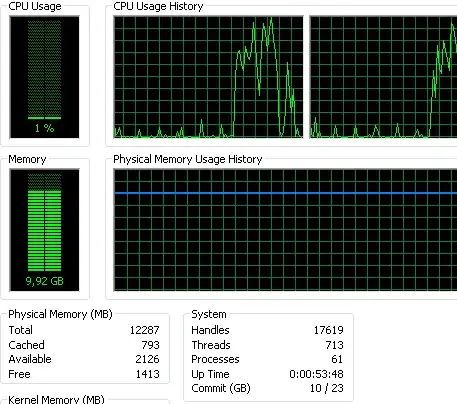
enter image description here

I took a look at this question which was talking about the sql locked page allocations memory. What I found though is that those values are normal - around 85 mb. Here is a screenshot of the command

select * from sys.dms_os_process_memorys

enter image description here

However based on the above picture I also see a total_virtual_space_kb of around 8.50 GB. Last, I ran RamMap which shows me that there are around 8.50 Gb in use by "Driver locked". Elsewhere it was suggested that this "Driver locked" memory is in use by VMWare.

I have a few questions:

1) Is this memory really consumed or will it be released to another process upon need? I have noticed that the server is noticeably slow so I am wondering if that has something to do with it. Further, I get commonly OutOfMemoryExceptions being thrown by my asp.net processes.

2) Who is allocating/using this memory? SQL or VMWare?

3) Is there a way for me to fix that issue?

Any help is appreciated.

sTodorov
  • 113

3 Answers3

2

I suspect this is a result of the hypervisor (ESX/i) "balloon" driver in action. The balloon driver works via the VMware tools, requesting a certain amount of memory from the guest OS without actually using it within the guest OS. This allows the hypervisor to use the memory elsewhere.

Ballooning is usually a good thing for a number of reasons, but with MSSQL it tends to be a bit of a hassle, because the SQL engine is very good at memory management itself.

Here's some more info on this which may explain better than I can:

ThatGraemeGuy
  • 15,788
0

Please check the memory reservation setting for all your VMs. it should be set to unlimited or to the max memory that is set on your server.

Go to vm settings, Tab resources. select memory and check the limitation.

Bart De Vos
  • 18,171
-1

SQL Server has to be limited in memory usage as best practice first. The best way to see how much memory your SQL server really need use perfmon:

Before reducing the max server memory value, use Performance Monitor to examine the SQLServer:Buffer Manager performance object while under a load, and note the current values of the Stolen pages and Reserved pages counters. These counters report memory as the number of 8K pages. max server memory should be set above the sum of these two values to avoid out-of-memory errors. An approximate value for the lowest reasonable max server memory setting (in MB) is ([Stolen pages] + [Reserved pages])/ 100

Source: TechNet (http://technet.microsoft.com/en-gb/library/ms178067(SQL.90).aspx)

Danilo Brambilla
  • 1,041
  • 2
  • 16
  • 34